RateCaptain
  • Home
    • About Us
    • Contact Us
  • FX Rates
  • Money Market
  • Cryptocurrency
  • Commodities
  • Corporates
No Result
View All Result
Subscribe
  • Home
    • About Us
    • Contact Us
  • FX Rates
  • Money Market
  • Cryptocurrency
  • Commodities
  • Corporates
No Result
View All Result
RateCaptain
No Result
View All Result
Home Technology

How To Know If Windows 11 Is Compatible With Your Device

Rate Captain by Rate Captain
October 4, 2021
in Technology
Reading Time: 6 mins read
A A
0
Share on FacebookShare on TwitterShare on WhatsappShare on Telegram

Windows 11 is almost here, but will your laptop be able to run it? Here’s how to find out using the PC Health Check app, WhyNotWin11 and more.

Windows 11 is almost here, and the big question on a lot of PC-users’ minds since Microsoft unveiled its first major operating system upgrade in six years is: Will my computer be compatible? There’s been some confusion about device compatibility since Microsoft’s big announcement of the updated OS earlier this summer. But the short answer is that Windows 11 should work with most PCs, according to a company blog post.

Annoyingly, Microsoft’s own tool for determining device compatibility — the PC Health Check app — wasn’t up to par when Microsoft first announced Windows 11 earlier this year (there were reports it didn’t give people enough information about why their devices weren’t compatible), so the company temporarily removed the app. But Microsoft’s PC Health Check is now back online and in working order. The app will tell you if your computer meets the requirements to run Windows 11, and if it doesn’t, it will tell you why and provide links for more support.

But that’s not the only way to check if your device will work with Windows 11, which you’ll be able to download for free once it’s available. Read on for all of your options for checking Windows 11 device compatibility. With the Windows 11 release date just a couple days away (note, however, that it’ll be a staggered rollout), it’s a good idea to check your own computer. In the case that your device doesn’t meet eligibility requirements, you may need to replace your PC by 2025 as Microsoft phases out Windows 10 over the next several years.

Option 1: Use Microsoft’s PC Health Check app to see if your computer can run Windows 11

Microsoft’s own tool is now available even if you’re not in the Windows Insider program. Follow these steps to test whether your PC meets the system requirements for Windows 11.

1. Download Microsoft’s PC Health Check. Open the file, agree to the terms of service and click Install. Make sure the box is checked that says Open PC Health Check, and click Finish.

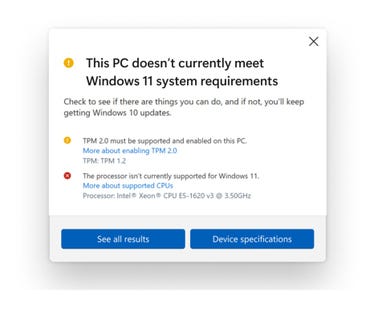
pc-health-checkHere’s what you’ll see after running the updated Microsoft PC Health Check app, if your device is not compatible with Windows 11.
Microsoft

2. The app home page that pops up says, “PC health at a glance.” At the top, a box reads, “Introducing Windows 11.” Click Check now.

If your machine is not compatible, you’ll get a message that says, “This PC doesn’t currently meet Windows 11 system requirements,” with more information below.

If your machine is compatible, you can download the Windows 11 update for free when it becomes available. The official Windows 11 release date is Oct. 5, but Microsoft is planning a staggered rollout, and many devices will not see the upgrade until 2022. If you’re part of the Windows Insider Program, you can download the Insider Preview build version now.

Option 2: Try the WhyNotWin11 app to check Windows 11 compatibility

An open-source app called WhyNotWin11 is a good alternative to the PC Health Check app. The Github app, created by a developer not affiliated with Microsoft, has a less friendly interface, but it should give you more information and go into more detail about various potential compatibility issues. Here’s more information from TechRadar on how to use it to determine your own device compatibility with Windows 11.

Option 3: Check Microsoft’s list of system specifications for Windows 11

To determine if your current PC will be able to run Windows 11, you can check out this list of system specifications on Microsoft’s website, or in the chart below. If your machine is compatible, you can download the Windows 11 update for free when it becomes available. If you’re part of the Windows Insider Program, you can download the Insider Preview build version now.

What are the system requirements to run Windows 11?

Here’s the full list of system requirements for Windows 11, including at least 4 gigabytes of RAM, 64GB of storage and a 720p display larger than 9 inches diagonally.


AlsoRead

ChatGPT Incorporates Content from Elon Musk’s Controversial Grokipedia in Responses

EU Fines Delivery Hero and Glovo €329M for Online Food Delivery Cartel

Airtel Drives Nigerian Stock Market to Record High, Surpassing N70 Trillion Mark

SOURCE: CNET.COM

Previous Post

Technology That Reveals What People Look At Most In Your Room

Next Post

Nigeria’s Debt Portfolio May Rise To N50 Trillion By 2023

Related News

AI chatbot ChatGPT stumbles as it reaches its limitations of intelligence.

ChatGPT Incorporates Content from Elon Musk’s Controversial Grokipedia in Responses

by Victoria Attah
January 26, 2026
0

OpenAI's ChatGPT has begun referencing material from Grokipedia, the AI-generated encyclopedia created by Elon Musk's xAI, in some of its...

GDP in Euro Area Declines by 0.1%, While EU Records a Modest 0.1% Increase

EU Fines Delivery Hero and Glovo €329M for Online Food Delivery Cartel

by Stephen Akudike
June 3, 2025
0

On June 2, 2025, the European Commission imposed a €329 million fine on Delivery Hero and its subsidiary Glovo for...

Airtel Nigeria Witnesses Surge in Data Consumption and Revenue Growth Amid 4G Expansion.

Airtel Drives Nigerian Stock Market to Record High, Surpassing N70 Trillion Mark

by Victoria Attah
May 28, 2025
0

On May 28, 2025, the Nigerian All-Share Index (NGX ASI) soared to a record high of 111,606.22, gaining 1,721.29 points...

NCC warns against the insecurity of WhatsApp.

Global WhatsApp Outage, Nigerians are feeling the Heat

by Victoria Attah
May 27, 2025
0

Today, May 27, 2025, WhatsApp, the messaging colossus that underpins daily communication for billions, ground to a halt. For several...

Next Post

Nigeria's Debt Portfolio May Rise To N50 Trillion By 2023

Leave a Reply Cancel reply

Your email address will not be published. Required fields are marked *

Recommended

2024 Budget Outline: Oil Price Set at $77.96, Naira Stands at 750 Against the Dollar

Nigeria and UAE Sign Landmark Trade Deal to Eliminate Tariffs on Thousands of Products

January 27, 2026
 Top Story: Central Bank Raises MPR by 200 Basis Points to 24.75%

National Grid Collapses Again, Plunging Nigeria into Nationwide Blackout

January 27, 2026

Popular Story

  • 2024 Budget Outline: Oil Price Set at $77.96, Naira Stands at 750 Against the Dollar

    Nigeria and UAE Sign Landmark Trade Deal to Eliminate Tariffs on Thousands of Products

    0 shares
    Share 0 Tweet 0
  • Dangote Refinery Suspends Petrol Sales and Cancels Contracts as Crude Supply Issues Bite

    0 shares
    Share 0 Tweet 0
  • US Records $1.45 Billion Trade Surplus with Nigeria in First 10 Months of 2025 as Exports Surge 60%

    0 shares
    Share 0 Tweet 0
  • Nigeria Customs Service Surpasses N7.2 Trillion Revenue Target in 2025

    0 shares
    Share 0 Tweet 0
  • National Grid Collapses Again, Plunging Nigeria into Nationwide Blackout

    0 shares
    Share 0 Tweet 0
RateCaptain

RateCaptain

We bring you the most accurate in new and market data. Check our landing page for details.

  • Home
  • About Us
  • Privacy Policy
  • Terms & Conditions
  • Disclaimer
  • Cookie Policy
  • Contact Us

Copyright © 2022 RateCaptain - All rights reserved by RateCaptain.

No Result
View All Result
  • Home
    • About Us
    • Contact Us
  • FX Rates
  • Money Market
  • Cryptocurrency
  • Commodities
  • Corporates

Copyright © 2022 RateCaptain - All rights reserved by RateCaptain.

RateCaptain
Manage Cookie Consent
To provide the best experiences, we use technologies like cookies to store and/or access device information. Consenting to these technologies will allow us to process data such as browsing behavior or unique IDs on this site. Not consenting or withdrawing consent, may adversely affect certain features and functions.
Functional Always active
The technical storage or access is strictly necessary for the legitimate purpose of enabling the use of a specific service explicitly requested by the subscriber or user, or for the sole purpose of carrying out the transmission of a communication over an electronic communications network.
Preferences
The technical storage or access is necessary for the legitimate purpose of storing preferences that are not requested by the subscriber or user.
Statistics
The technical storage or access that is used exclusively for statistical purposes. The technical storage or access that is used exclusively for anonymous statistical purposes. Without a subpoena, voluntary compliance on the part of your Internet Service Provider, or additional records from a third party, information stored or retrieved for this purpose alone cannot usually be used to identify you.
Marketing
The technical storage or access is required to create user profiles to send advertising, or to track the user on a website or across several websites for similar marketing purposes.
  • Manage options
  • Manage services
  • Manage {vendor_count} vendors
  • Read more about these purposes
View preferences
  • {title}
  • {title}
  • {title}
?>